
SQL views as tables: hidden fields, rows per role, states
BraDypUS has no per-field permissions and no workflow engine (Groups & locks work on whole rows). You can still get both with the database itself: a SQL view can be registered as a table, and BraDypUS treats it like any other table. Each role gets a view that contains only the columns and rows that role may see, and a trigger on the real table decides which state changes are legal.
You write the SQL; BraDypUS registers it
BraDypUS does not create or edit views: you write the SQL. Since it can register an existing view from Config → Database objects, without touching bdus_cfg_* by hand, and it knows whether the view can be written. It is proven on MariaDB 10.11 and PostgreSQL 16; read What is proven and Limits before you rely on it.
When to use it
| You need | Use |
|---|---|
| Some roles must not even see a column (reviewer notes, personal data) | A view without that column |
| A role works only on records in some state (drafts, to be reviewed) | A view with WHERE state IN (...) |
| A role may only make certain state changes (draft → submitted, never → validated) | A trigger on the base table |
| An anonymous, read-only public face of a few columns of validated records | A view + a group API key |
| Whole rows visible to some groups only, or records frozen once done | Plain groups & locks: no views needed |
If a rule on whole rows is enough, do not use views.
Why there are no per-field permissions
This is a choice, not a missing feature. A hidden field must disappear from every place that reads it: the record, lists, text search, filters (a condition such as field = x reveals the value even if the column is not shown), exports, the edit history, charts, maps and templates. Filtering at each of those points leaves room for a silent leak the day someone forgets one. A view works the other way round: the column does not exist for that group, so there is nothing to forget. If you have a case that views cannot cover, describe it in a GitHub issue; it will be reconsidered starting from that case.
The idea in one example
A table card with roles author, supervisor, validator and an anonymous public reader:
| Role | Reads | Writes | Sees rows in state |
|---|---|---|---|
| Author | number, text, state | text | draft, rejected |
| Supervisor | + supervisor_notes | supervisor_notes, state | submitted |
| Validator | everything (the base table) | validator_notes, state | all |
| Public key | number, text | nothing | validated |
1. The base table
Create card the usual way (Config → Tables and Fields, or DBML), with the columns number, text, supervisor_notes, validator_notes, state. Every column that some view leaves out must accept NULL or have a default, because inserts through that view cannot set it.
2. The views
CREATE VIEW v_author AS
  SELECT id, creator, number, text, state
  FROM card WHERE state IN ('draft', 'rejected');

CREATE VIEW v_supervisor AS
  SELECT id, creator, number, text, supervisor_notes, state
  FROM card WHERE state = 'submitted';

CREATE VIEW v_public AS
  SELECT id, number, text
  FROM card WHERE state = 'validated';
Keep id (and creator, when you want the record to remember who created it) in every view that can write: BraDypUS addresses every record by id.
Where to run this SQL
The easiest place is Run SQL in the sidebar (super admin only; it asks for the password again). It runs CREATE VIEW, DROP VIEW, CREATE TRIGGER and the like on the application's own database, on SQLite, PostgreSQL and MariaDB alike (checked by automated tests on all three). A database client works just as well. Three things to know about Run SQL:
- One statement per run. A second statement in the same run is an error on every engine and nothing is executed (a trailing
;is fine). Run the statements one at a time. - No
DELIMITER. That is a keyword of themysqlcommand-line client, not of SQL. Give a trigger as a singleCREATE TRIGGER … BEGIN … ENDstatement; the semicolons inside the body are fine. On PostgreSQL a trigger is two statements: firstCREATE FUNCTION … LANGUAGE plpgsql(with its body in$$ … $$), thenCREATE TRIGGER … EXECUTE FUNCTION …. - MariaDB and MySQL commit DDL by themselves. A
CREATE VIEWthat succeeds cannot be rolled back, and if a later part of your plan fails the view stays. (Before 5.17.0 Run SQL answered an error for aCREATE VIEWon these two engines even though the view had been created.)
Run SQL does not register anything in BraDypUS: after creating the view, go on to step 3.
3. Register each view as a table
Open Config → Database objects: the views are listed with a view badge and, next to it, read-only or writable. Click Preview and activate, check the fields and the SQL and Activate. Nothing is written to the view; only the configuration is created. The full description is in Database objects.
A view can be activated only if it has an id column, and, when it can be written, a creator column too. Both must come from a base table: BraDypUS addresses every record by id, and stores in creator who created it.
Before 5.17.0 (kept for older installations)
Registration meant creating a table in Config → Tables with the fields of the view and then DROP TABLE / CREATE VIEW under the same name, or copying rows of bdus_cfg_tables and bdus_cfg_fields in SQL. Both still work, but the view is then not flagged as a view, so the protections below do not apply to it. Remove it from the configuration and activate it again.
What you cannot change on a registered view
From the Config panel you can set labels, field types and the preview, but adding, renaming or deleting a field, renaming the view, adding indexes or relations, and switching on system plugins are refused (view_not_alterable). Change the view in SQL (CREATE OR REPLACE VIEW), then Config → Validation shows what no longer matches. See Limits.
Writing through a view
What a registered view can do depends on the engine. BraDypUS does not write SQL for you: the view is created by hand, and so is whatever makes it writable.
| Engine | Reading, charts, API | Creating, changing, deleting records |
|---|---|---|
| SQLite | Always | Only if you add INSTEAD OF triggers (example below). Without them the view is read-only |
| PostgreSQL, MariaDB / MySQL | Always | Natively, for the views the engine itself considers updatable: in practice a view on one table, without DISTINCT, GROUP BY, aggregates or UNION. Other views are read-only, or, on PostgreSQL, writable through INSTEAD OF triggers |
When a view is activated, BraDypUS records how it can be written (view_writable):
| Meaning | |
|---|---|
none | Read-only. The interface hides Edit, Duplicate, Delete and New; the server answers view_read_only |
probe | The database says the view is updatable (PostgreSQL, MariaDB) |
trigger | Writable through INSTEAD OF triggers |
A read-only view is not a lesser one: it is the usual way to give charts, searches and the API a flat, prepared version of the data.
SQLite: making a view writable
On SQLite a view is writable only through INSTEAD OF triggers. For a view on one table the three triggers below are all that is needed. Adapt the names and the column lists: this example is a view v_site over a table site that exposes id, creator, name and place.
CREATE TRIGGER v_site_ins INSTEAD OF INSERT ON v_site
BEGIN
  INSERT INTO site (id, creator, name, place)
  VALUES (NEW.id, NEW.creator, NEW.name, NEW.place);
END;

CREATE TRIGGER v_site_upd INSTEAD OF UPDATE ON v_site
BEGIN
  UPDATE site SET name = NEW.name, place = NEW.place
  WHERE id = OLD.id;
END;

CREATE TRIGGER v_site_del INSTEAD OF DELETE ON v_site
BEGIN
  DELETE FROM site WHERE id = OLD.id;
END;- Do not invent the
idin the insert trigger: leaveNEW.idas it comes (empty) and let the base table assign it. BraDypUS reads the newidfrom the base table inside the same transaction, because SQLite's own "last inserted id" is stale after an insert through a view. creatoris written on insert and never updated, so a record keeps the person who created it.- Columns of the base table that the view leaves out must accept
NULLor have a default, or every insert fails. - A view with a
WHEREcan make a row disappear from the view as soon as it is saved (a new or changed row that no longer matches). That is how the triggers behave, not a BraDypUS rule. - Recreating the view drops its triggers (SQLite drops them with the view): run the three statements again.
After adding or dropping triggers, open the view's settings (Config → Tables) and press Re-check how it can be written: BraDypUS reads it again and updates view_writable, without touching labels or field settings. The view needs a creator column to be writable; without it the button refuses.
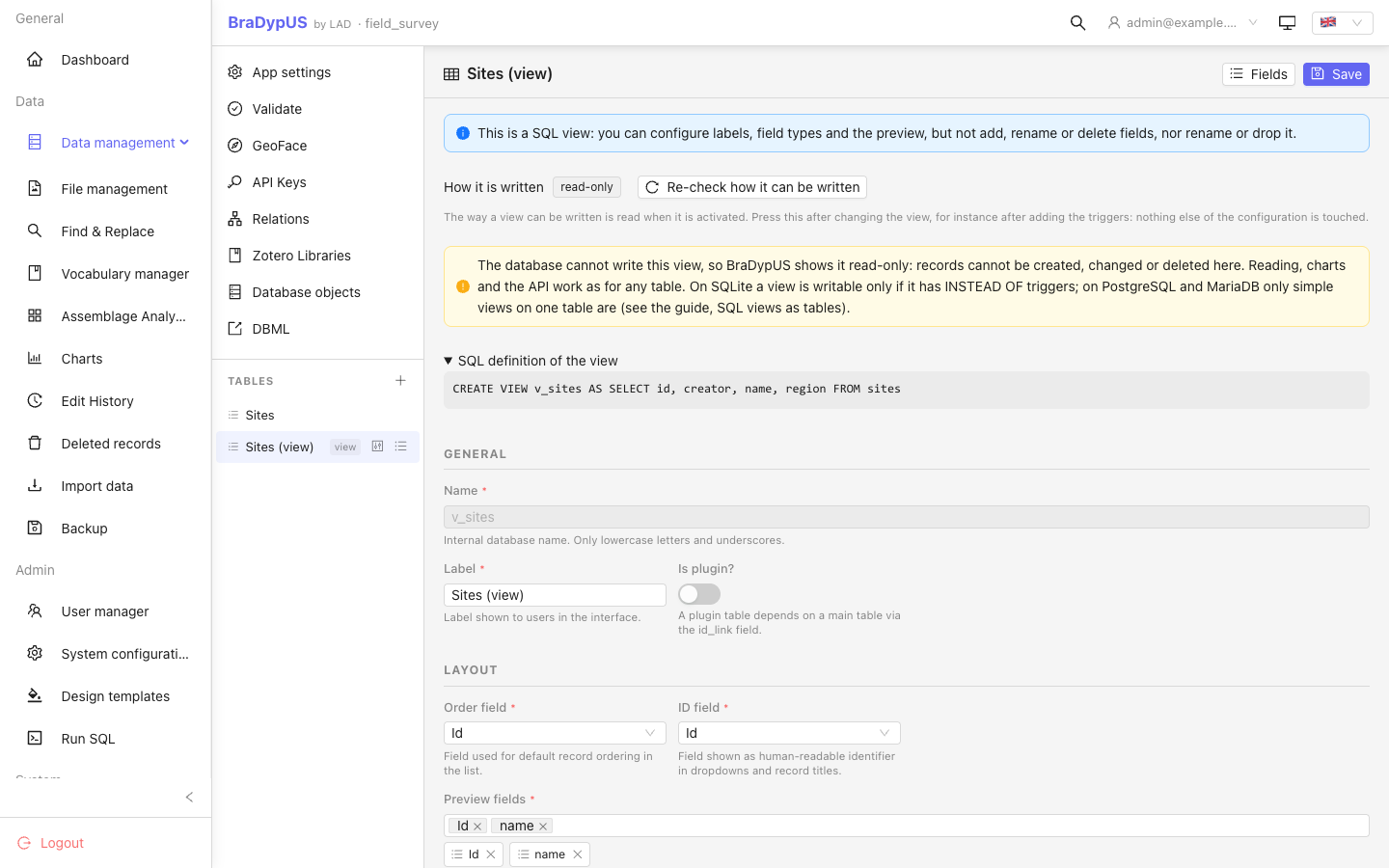
PostgreSQL and MariaDB
A simple view works as it is, with no triggers. Two things to know:
- The new record gets its
idfrom the base table, so the base table must assign it (a sequence orAUTO_INCREMENT); anINSTEAD OFtrigger on PostgreSQL that inserts with an explicit id can make the new id come back wrong. probesays the engine considers the view updatable, not that every save will succeed: a constraint of the base table can still refuse it, and the user sees a generic error.
History, locks and rules
The history (bdus_versions), locks and group rules of a view are kept under the view's name, exactly as for a table. This is by design: a person working through a view should not notice that it is not a table. The consequence is that a change made on the base table does not appear in the history of the view, and a lock on the view does not block the base table (and the other way round): put every rule and lock on every name that can reach the data.
4. One group per view
Create the groups and the rules on the view names (Users → Groups, or PUT /api/group/{id}/rules; Groups & locks). Users are at level Enter (39), so the group decides everything.
| Group | Table | Create | Read | Update | Delete |
|---|---|---|---|---|---|
| Authors | v_author | All | All | All | off |
| Supervisors | v_supervisor | off | All | All | off |
| Validators | card | All | All | All | All |
| Public | v_public | off | All | off | off |
A user whose group has no rule on a table gets not_enough_privilege for that table. A group key for the public reader is created with POST /{app}/api/api-keys at level 39 with the group_id of Public; the key reads v_public and nothing else (API keys with a group).
5. Triggers on the base table
The code below is MariaDB/MySQL. On PostgreSQL the same logic is a PL/pgSQL function (RAISE EXCEPTION instead of SIGNAL, nextval or a counter row for the number) attached with CREATE TRIGGER … BEFORE INSERT/UPDATE … EXECUTE FUNCTION.
The views decide what each role sees. The triggers decide what each role may write, because a rule on a table or a row does not look at the values written.
DELIMITER //   -- mysql command-line client only: in Run SQL give each trigger as one statement, without DELIMITER

-- Initial state and an automatic, sequential number.
CREATE TRIGGER card_bi BEFORE INSERT ON card FOR EACH ROW
BEGIN
  DECLARE k INT;
  IF NEW.state IS NULL OR NEW.state = '' THEN SET NEW.state = 'draft'; END IF;
  IF NEW.state <> 'draft' THEN
    SIGNAL SQLSTATE '45000' SET MESSAGE_TEXT = 'a card is born as a draft';
  END IF;
  IF NEW.number IS NULL OR NEW.number = '' THEN
    UPDATE counter SET n = n + 1 WHERE id = 1;       -- locks the row: no duplicates
    SELECT n INTO k FROM counter WHERE id = 1;
    SET NEW.number = CONCAT('C', LPAD(k, 6, '0'));
  END IF;
END//

-- Immutable number; only the allowed state transitions.
CREATE TRIGGER card_bu BEFORE UPDATE ON card FOR EACH ROW
BEGIN
  IF NEW.number <> OLD.number THEN
    SIGNAL SQLSTATE '45000' SET MESSAGE_TEXT = 'the number cannot change';
  END IF;
  IF NEW.state <> OLD.state AND NOT (
       (OLD.state = 'draft'     AND NEW.state = 'submitted')
    OR (OLD.state = 'rejected'  AND NEW.state = 'submitted')
    OR (OLD.state = 'submitted' AND NEW.state IN ('reviewed', 'rejected'))
    OR (OLD.state = 'reviewed'  AND NEW.state IN ('validated', 'rejected'))
    OR (OLD.state = 'validated' AND NEW.state = 'reopened')) THEN
    SIGNAL SQLSTATE '45000' SET MESSAGE_TEXT = 'state transition not allowed';
  END IF;
END//

DELIMITER ;
with a one-row table counter (id INT PRIMARY KEY, n INT NOT NULL) seeded with (1, 0). In the test, 20 concurrent inserts got distinct, consecutive numbers.
The text of SIGNAL SQLSTATE '45000' (MariaDB/MySQL) or RAISE EXCEPTION (PostgreSQL) reaches the user: when a record save is refused by a trigger, the message is shown as it is. If it is the key of a translation known to the app, it is translated. Any other database error, such as a constraint violation, only shows a generic message, without SQL text. Triggers on SQLite are not covered.
Because each role sees only rows in the states it acts on, it can only make the transitions that start from there: the author never sees a submitted card, so cannot move it; the supervisor sees only submitted cards, so cannot validate a draft. The trigger adds the second lock: even a legitimate row cannot jump to a state the table does not allow, for instance an author setting validated on his own draft.
WITH CHECK OPTION or a trigger?
Two ways to stop a save that would take the row out of its view.
WITH CHECK OPTION on the view | Trigger on the base table | |
|---|---|---|
| What it stops | Any change that leaves the row outside the view's WHERE | Only the transitions you list |
| Closing a card (draft → submitted) | Refused: the row would leave v_author | Allowed: it is a listed transition |
| Use it for | Roles that must keep records where they are | A real workflow, where records move between roles |
For a workflow use the trigger and no CHECK OPTION on the views that must let rows leave. CHECK OPTION suits a view where leaving is always an error.
Behaviour you can rely on (proven)
- The view is in
/api/config/tables, in lists, record view, search, filters and export. - A column that is not in the view cannot be read, cannot be searched (
'field' is not a plugin, backlinked table, or lookup … field) and is not in the export. - Inserting and updating through a simple view (one table) works: the new
idis returned,creatoris set, accents and Greek are intact. - Restoring a version through a view works, including bringing back a deleted record (admin only, as for any table).
- Deleting through a view works if the group's rule allows it.
- A group without a rule on a view gets
not_enough_privilege: HTTP200with a JWT, HTTP403with an API key.
Limits
These are the things that surprise people. Read them before you plan.
- Engine. The pattern was tried on MariaDB 10.11 and PostgreSQL 16 (triggers are written in each engine's own language:
SIGNALon MariaDB, PL/pgSQL on PostgreSQL). On SQLite, versions up to 5.16.2 dropped every SQL view at the next login; from 5.16.3 views are kept (and removed only by the v4 → v5 major upgrade, for v4 leftovers). That fix is covered by a test, but the whole pattern was not run on SQLite. PostGIS was not tried. - Simple views (one table) write directly. A view that joins several tables is not updatable by itself. On PostgreSQL, with
INSTEAD OFtriggers, it was written to successfully (insert returning the id, update across tables, cascading delete, search on a field of the second table). Not tried on MariaDB, which has noINSTEAD OFtriggers. - Columns left out must accept
NULLor have a default, or inserts through the view fail. - Only a trigger's own message reaches the user. The text of a
SIGNAL(MariaDB/MySQL) orRAISE EXCEPTION(PostgreSQL) is shown as it is, and translated if it is the key of a translation the app knows; any other database error, such as a constraint violation, is a generic message without SQL text (error_saved). Name your states and transitions in the user documentation too, not only in the trigger message. - The history is split by view.
bdus_versionsstores the name of the view and only its columns: a record's history is fragmented across the views it was edited through, and a version made throughv_publicknows nothing about the hidden columns. This is intended (see Writing through a view). A save that the database then rejects still leaves a version row behind (the copy is taken before the update). - Locks and rules are per table name. A lock on
v_authordoes not freeze the same record when it is edited throughcard, and a lock oncarddoes not stop edits made through a view (both seen: the first on MariaDB, the second reported on PostgreSQL). Put every rule and lock on every name that can reach the data. - Rule and lock filters use the view's fields. A filter on a column that the view does not contain is refused when you save it.
- Hidden columns are hidden from the app, not from the database. Anyone with database access, and every backup, sees everything.
- A registered view cannot be altered from Config (
view_not_alterable, since 5.17.0; before, it reported success and changed nothing). Adding a field to the base table does not add it to the views: change the view in SQL, then remove it from the configuration and activate it again to pick up the new column (the Re-check how it can be written button only updates how the view is written, not its columns). - DBML. Since 5.17.0 a registered view is exported with
bdus:view=1, and importing it activates the view of the same name that must already exist in the target database; it never creates a view (see DBML). Before, a view was exported as an ordinary table and the import created a real table.
What is proven and what is not
Proven here = run again while writing this page (MariaDB 10.11, v5.16.2). Reported = seen by the people who first tried the pattern, not repeated here.
| Statement | MariaDB 10.11 | PostgreSQL 16 |
|---|---|---|
| View in table list, records, search, filters, record view | Proven here | Reported |
Insert/update through a simple view, creator, UTF-8 | Proven here | Reported |
| Hidden column unreadable, unsearchable | Proven here | Reported |
| Rules per view; 200 with JWT, 403 with API key | Proven here | Reported |
| Trigger rejects a transition; its message is shown, a constraint violation stays generic | Covered by a test (DBExceptionRuleMessageTest) | Reported |
A save rejected by a trigger still writes a bdus_versions row | Proven here | Not checked |
| Versions record the view name and the view's columns | Proven here | Reported |
| Restore through a view (update and deleted record) | Proven here | Reported (a trigger can refuse a restored state) |
| Lock on a view does not lock the base table, and the other way round | Proven here (view → base) | Reported (both ways) |
| Registering by creating the table, then swapping it for a view (before 5.17.0) | Proven here | Not checked |
| Registered view appears as a table in DBML export (before 5.17.0) | Proven here | Not checked |
| Config panel field changes on a view do not change the view (before 5.17.0) | Proven here (view unchanged; configuration not inspected) | Not checked |
WITH CHECK OPTION refuses a row leaving the view | Reported | Not tried |
| 20 concurrent inserts give consecutive numbers (counter table) | Reported | Not checked |
| CSV export of a view omits hidden columns | Reported | Reported |
Multi-table view written through INSTEAD OF triggers | Not available | Reported |
| A large real dataset and the graphical interface (list, record, edit, save as a group user) | Not checked | Reported |
| SQLite up to 5.16.2 drops views at the next login | Fixed in 5.16.3; fix covered by a test, pattern not run on SQLite | |
| Alter of a view's fields from the interface | Refused with view_not_alterable since 5.17.0 | Same code, run on SQLite |
| PostGIS, performance under concurrent load on real data | Not tried |
Since 5.17.0 (automated tests, not a hand run)
| Statement | SQLite | MariaDB 11 | PostgreSQL 16 |
|---|---|---|---|
| Views, columns, SQL and writability are read from the database | Test | Test | Test |
| Foreign keys are read from the database | Test | Test | Test |
New id after an insert through a view is right | Handled in the code (MAX(id) in the transaction), tested | Test | Test |
Activation, is_view flag, view_read_only, view_not_alterable, DBML bdus:view | Test | Routes only (HTTP) | Routes only (HTTP) |
| Activation of a view run end to end (SQL → configuration → record) | Test and by hand in the interface | Not run | Not run |
| Writable view updated and deleted through triggers | Test (INSTEAD OF) | Not run | Not run |